skip to main |
skip to sidebar
Here's a really simple technique that I had fun experimenting with. With film SLRs, you could literally expose your film twice. You would just leave the camera on a tripod, underexpose a photo by one stop, rewind the film, move something in the photo, and expose the same frame again. With digital, it's pretty hard to do that in-camera. But it's really easy to do it in Photoshop (or GIMP, or any other editor that supports layers).

click to enlarge, or see it on Flickr
Aperture: f/3.5 (both frames)
Shutter Speed: 4 seconds (both frames)
ISO: 100 (both frames)
Focal Length: 23 mm (both frames)
Tripod
First, set up your camera on a sturdy tripod. For the best results, you need to keep the camera perfectly still between shots, otherwise you'll end up with ghosting. For this reason, I chose to shoot inside, because it was a rather windy day. It was kind of dark in this room, which explains the long shutter speed.
Anyway, for digital "double exposure" photos, you don't need to worry about underexposing by a frame or anything like that. Just take two photos with the subject (in the example above, it's me) moving between them.
Then load into Photoshop. I converted to black and white because the color temperature and stuff looked really awful. The technique would probably work just as well in color. Once you have any corrections done (make sure they're exactly the same for each photo), simply copy and paste one photo over the other in a new layer. The blending mode should stay on "Normal." Then change the opacity of the top layer to 50%. This will make a balance between the exposure of your subject in each frame. If you wanted one to be fainter, adjust the opacity accordingly.
That's it! Flatten the image and crop if desired. I think I will be having a lot of fun with this technique.
This is one of the best landscapes I think I have ever produced.

click to enlarge, or see it on Flickr
Aperture: f/11
Shutter Speed: 1/250
ISO: 100
Focal Length: 18 mm
Tripod
It really needs to be viewed as large as possible. I wish I could offer more than 1024 pixels wide, but yeah, Flickr. The custom black & white controls in Lightroom and shooting in RAW made all the difference here. I'm seriously considering getting this printed in a large-ish size.
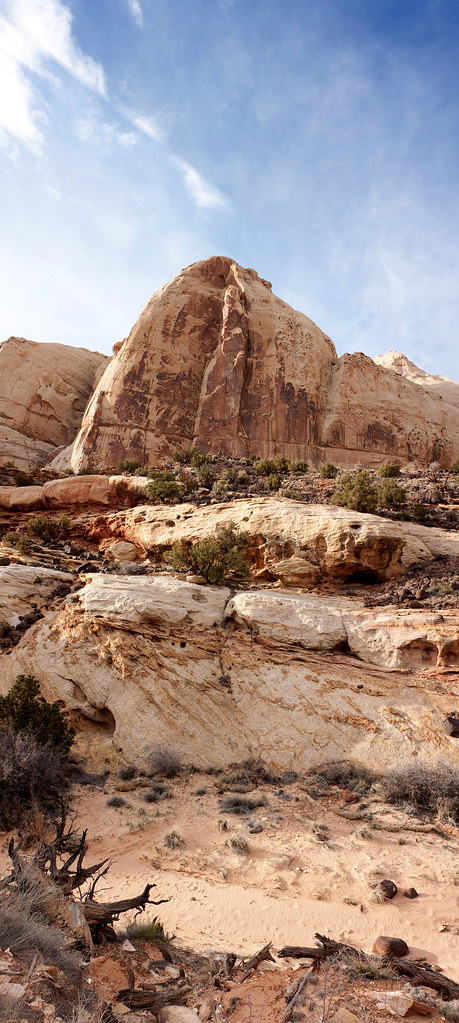
While at Capitol Reef, I decided to try a vertical panorama, something that I had heard of, but never attempted. Long story short, it worked really well. The nature of this image means that when I crunched it down to 1024 pixels tall, it got really skinny, but rest assured that in full quality, it looks nice :)

click to enlarge, or see it on Flickr
Aperture: f/8 (all frames)
Shutter Speed: 1/200 (all frames)
ISO: 100
Focal Length: 55 mm (all frames)
Tripod
The composition isn't spectacular, but this was more an exercise than anything else.